NTI® - Network Technologies Incorporated

Rackmount USB Matrix KVM Switch

Industrial USB KVM switch, USB KVM switcher

Clearance: USB Matrix KVM Switch

How to enable up to four users to control eight USB-enabled PC, SUN and MAC computers

Limited Stock.All sales final on clearance items.

The UNIMUX-nXm-U Multi-Platform Matrix KVM switch: How to enable up to 4 users to individually command or simultaneously share up to 8 computers.
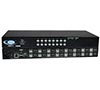
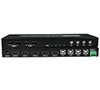
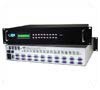
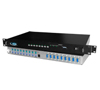
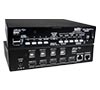
UNIMUX-4x8-UDT-CLR (Front & Back)


Designed and Manufactured in the U.S.A.

RoHS Compliant USB Matrix KVM Swit

Crestron® I²P Compatible

Features & Applications

The UNIMUX™ USB Matrix KVM switch allows up to four users to individually command or simultaneously share up to 8 USB computers.Access USB-enabled PC, SUN, and MAC computers using USB keyboards and mice, and VGA multiscan monitors.

USB host computers and USB devices can be hot-plugged or removed at any time. Allows any USB device (keyboard and/or mouse) to control any attached USB host computer. International keyboard layouts are supported in auto-detection mode, or can be manually selected via the On Screen Display (OSD) menu.
  • Equipped with OSD, Liquid Crystal Display, and RS232.
  • Dedicated microprocessors prevent computers from locking up, ensuring reliable control.
  • Fully compliant with USB standards (1.0, 1.1).
  • The advanced OSD user interface with password security makes the UNIMUX USB Matrix KVM Switch simple and reliable to use in Enterprise data centers.
  • Computers can be shared or used exclusively.
  • Crestron® compatible.

Specifications

Hosts
  • Female 15-pin HD and Female USB Type B connectors.
  • Supports PCs with USB-enabled OS (Windows 98/ME/2000/XP, Windows Server 2003, Linux) and USB ports.
  • Supports PCs with USB-enabled BIOS (legacy USB support) and USB ports.
  • Supports SUN Blade 100, SUN Blade 1000, SUN Fire™ 240 and SUN Ray.
  • Supports MAC G4, G5 and Xserve.
  • Supports MAC soft (keyboard) power-on.
  • Any legacy PS/2 or SUN computer can be connected by using a USB-PS2-R or USB-SUN-R adapter.
Monitor
  • Crisp and clear 1900x1200 resolution.
  • Two Female 15-pin HD connectors.
  • A multiscan VGA monitor is required to display the different video outputs from different platforms.
  • Bandwidth is 150 MHz.
Cables
  • Interface cables between your computers and the switch are required for proper operation.Use USBVEXT-xx-MM and standard interface cables to connect switches to computers.
  • Cables not included.
Devices
  • Female USB Type A connectors for keyboards and mice.
  • Compatible with most USB keyboards and mice, including Microsoft USB Intellimouse®, Logitech Cordless Elite Duo keyboard and mouse, Gyration keyboard/mouse and Crystal Vision keyboard with touchpad.
  • Keyboard and mouse are hot-pluggable.
  • USB MAC and SUN startup keys are supported on all platforms of input devices.
  • Keystrokes are translated across platforms.
Power
  • 110 or 220 VAC at 50 or 60 Hz via AC adapter.
  • Power consumption: 10W
Environmental
  • Operating temperature: 32°F to 100°F (0°C to 38°C)
  • Storage temperature: -20°F to 140°F (-30°C to 60°C)
  • Operating and Storage Relative Humidity: 17 to 90% non-condensing RH.
Regulatory Approvals
  • RoHS


Control Methods

Keyboard
  • Type <Ctrl> + <`> to go into Command Mode.
  • Press <ESC> to leave Command Mode and return to Normal Mode.
  • Use the keyboard to command the switchbox to select ports or configure the Scan, Sharing and Broadcast Modes.
    • Normal Operating Mode allows the user to directly operate the selected computer with a transparent presence of the NTI switch.
    • Sharing Mode allows users to share the same computer.
    • Command Mode allows the user to give instructions to the switch through their keyboard. Keystrokes are not passed to the computer.
    • Scan Mode feature causes the switch to automatically and sequentially display the video from each selected powered on computer for a duration of 2-255 seconds (programmable by the user).
    • Broadcast Mode allows the user's keystrokes to be sent to all selected powered on computers.
RS232
  • Female DB9 connector.
  • Baud rate 300 through 9600, DIP switch selectable.
  • Use DIP switches to address up to 15 units, all of which can be daisy-chained and controlled by one serial port.
  • Seven segment displays show what input is connected to each output.
  • Commands
    • RS - causes switch to reset so that IN1 connects to OUT1, IN2 connects to OUT2.
    • CS - causes one INx/OUTx connection to occur.
    • CA - causes all inputs to connect to specified output.
    • RO - reads what input is connected to specified output.
    • RU - reads size of matrix, reports number of inputs and number of outputs on specified switch.


Front Panel Interface
  • Locally change ports with front panel buttons.
  • Use front panel buttons to move through LCD screens and execute actions.
  • LCD indicates currently selected port for each user.
  • Use buttons to configure RS232 control.
    • Change baud rates for RS232.
On Screen Display (OSD)
  • Use keyboard or mouse to operate the switch from menus superimposed onto your monitor.
  • Type <CONTROL> + <`> to activate OSD.
  • Control, Scan, & Broadcast functions.
  • View vital port information.
  • Search for ports by name.
  • Search Mode lets the user type in the first few letters of the computer's name and the OSD will locate it.
  • Names can be up to 12 characters long.
  • Shows names of computers on cascaded switches up to 128 ports.
  • Displays the computer's platform next to its name.
  • Modify the size and position of the OSD.
  • Help Screens assist users with the OSD.
  • OS- and software-independent.
  • Our OSD comes built into your switch, so you do not have to install additional hardware or software.
  • Security
    • Advanced security included with switch.
    • Each user password & name can be up to 15 characters long, and each switch can store up to 63 users.
    • Administrator can enable or disable all security features and select which computers each user can access.
    • Once security is enabled, a user or administrator must "login" in order to access any of the computers connected to the switch.
The UNIMUX-nXm-U Multi-Platform USB Matrix KVM switch: How to setup and individually contol or simultaneously share many computers.

USB Matrix KVM Switches

NTI Part # # of
Users
(n)
# of
CPUs
(m)
Weight (lbs) WxDxH (in.) Price $ # to
Buy
UNIMUX-2X8-UDT-CLR 2 8 4 10x7.5x3.3 1,260 630
UNIMUX-4X8-UDT-CLR 4 8 6 10x7.5x3.3 1,775 890

Limited stock. All sales final on clearance items
 

Compatible Cables

Male to Male VGA,
Male USB A to Male USB B
(USBVEXT-xx-MM)
Length (ft.) Price $ # to Buy
3 13
618
1023
15 31
Male to Female VGA (VEXT-15)
1517