VGA USB KVM Matrix Switch
Multiple users control many USB-enabled PC, SUN and MAC computers
Also known as: Industrial USB KVM Matrix Switch, multiple users control many USB PC SUN MAC Computers, rackmount USB KVM matrix switch.

Additional Images
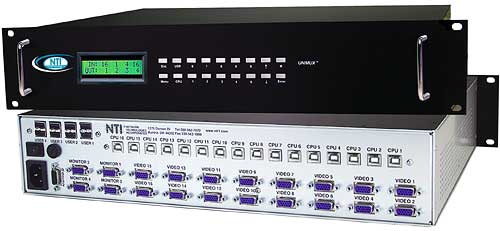
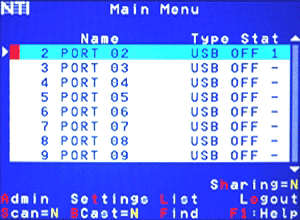
The UNIMUX™ VGA USB KVM Matrix Switch allows multiple users to individually command or simultaneously share many USB computers. Access USB-enabled PC, SUN, and MAC computers using USB keyboards and mice, and VGA multiscan monitors.
USB host computers and USB devices can be hot-plugged or removed at any time. Allows any USB device (keyboard and/or mouse) to control any attached USB host computer. International keyboard layouts are supported in auto-detection mode, or can be manually selected via the On Screen Display (OSD) menu.
The UNIMUX™ VGA USB KVM Matrix Switch allows up to eight users to individually command or simultaneously share up to 32 USB computers. Access USB-enabled PC, SUN, and MAC computers using USB keyboards and mice, and VGA multiscan monitors.
USB host computers and USB devices can be hot-plugged or removed at any time. Allows any USB device (keyboard and/or mouse) to control any attached USB host computer. International keyboard layouts are supported in auto-detection mode, or can be manually selected via the On Screen Display (OSD) menu.
- Equipped with OSD, Liquid Crystal Display, and RS232.
- Rackmount is standard on all UNIMUX-nXm-U models.
- Dedicated microprocessors prevent computers from locking up, ensuring reliable control.
- Fully compliant with USB standards (1.0, 1.1).
- The advanced OSD user interface with password security makes the UNIMUX USB KVM Matrix Switch simple and reliable to use in Enterprise data centers.
- Computers can be shared or used exclusively.
- Crestron® compatible.
Hosts
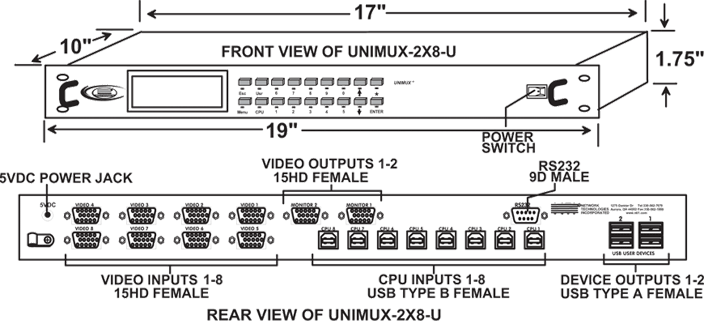
- Eight female 15-pin HD and eight female USB Type B connectors.
- Supports USB-enabled PC, SUN and MAC computers with VGA video.
- Multiplatform support: Windows 7/8/10/11, Windows Server 2008/2012/2016/2019/2022, Solaris, Linux, FreeBSD, and MAC OS 10/11/12/13.
- Supports MAC soft (keyboard) power-on.
- Any legacy SUN computer can be connected by using a USB-SUN-R adapter.
Monitor
- Crisp and clear 1920x1200 resolution.
- Two Female 15-pin HD connectors.
- A multiscan VGA monitor is required to display the different video outputs from different platforms.
- Bandwidth is 150 MHz.
Cables
- Interface cables between your computers and the switch are required for proper operation. Use USBVEXT-xx-MM and standard interface cables to connect switches to computers.
- Cables not included.
Environmental
- Operating temperature: 32°F to 100°F (0°C to 38°C)
- Storage temperature: -22°F to 140°F (-30°C to 60°C)
- Operating and Storage Relative Humidity: 5 to 90% non-condensing RH.
Devices
- Two sets of female USB Type A connectors for keyboards and mice.
- Compatible with most USB keyboards and mice, including Microsoft USB Intellimouse®, Logitech Cordless Elite Duo keyboard and mouse, Gyration keyboard/mouse, Crystal Vision keyboard with touchpad, and iKey DI-5K USB.
- Keyboard and mouse are hot-pluggable.
- USB MAC and SUN startup keys are supported on all platforms of input devices.
- Keystrokes are translated across platforms.
Power
- 100 to 240 VAC at 50 or 60 Hz via AC adapter.
- Power consumption: 10W
- Use the PWR-48V-5V2A DC-DC power converter to install the UNIMUX-2X8-U in a Telecom environment.
MTBF
- 58,644 hrs
Regulatory Approvals
- CE, RoHS
- TAA compliant
Warranty
- Two years
Compatible NTI Products
- Combine NTI emulators and switches for complex applications.
- VGA EDID Emulator (VGA-EDID-EMLTR2)
Hosts
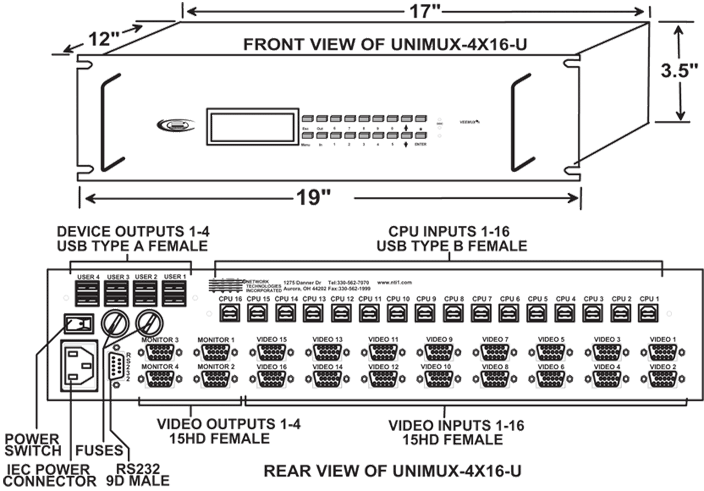
- Sixteen female 15-pin HD and sixteen female USB Type B connectors.
- Supports USB-enabled PC, SUN and MAC computers with VGA video.
- Multiplatform support: Windows 7/8/10/11, Windows Server 2008/2012/2016/2019/2022, Solaris, Linux, FreeBSD, and MAC OS 10/11/12/13.
- Supports MAC soft (keyboard) power-on.
- Any legacy SUN computer can be connected by using a USB-SUN-R adapter.
Monitor
- Crisp and clear 1920x1200 resolution.
- Four Female 15-pin HD connectors.
- A multiscan VGA monitor is required to display the different video outputs from different platforms.
- Bandwidth is 150 MHz.
Cables
- Interface cables between your computers and the switch are required for proper operation. Use USBVEXT-xx-MM and standard interface cables to connect switches to computers.
- Cables not included.
Environmental
- Operating temperature: 32°F to 100°F (0°C to 38°C)
- Storage temperature: -22°F to 140°F (-30°C to 60°C)
- Operating and Storage Relative Humidity: 5 to 90% non-condensing RH.
Devices
- Four sets of female USB Type A connectors for keyboards and mice.
- Compatible with most USB keyboards and mice, including Microsoft USB Intellimouse®, Logitech Cordless Elite Duo keyboard and mouse, Gyration keyboard/mouse, Crystal Vision keyboard with touchpad, and iKey DI-5K USB.
- Keyboard and mouse are hot-pluggable.
- USB MAC and SUN startup keys are supported on all platforms of input devices.
- Keystrokes are translated across platforms.
Power
- 100 to 240 VAC at 50 or 60 Hz
- Power consumption: 25W
- Add -48V5V10A, optional internal DC-DC converter to install the UNIMUX-4X16-U in a Telecom environment.
MTBF
- 50,289 hrs
Regulatory Approvals
- CE, RoHS
- TAA compliant
Warranty
- Two years
Compatible NTI Products
- Combine NTI emulators and switches for complex applications.
- VGA EDID Emulator (VGA-EDID-EMLTR2)
Hosts
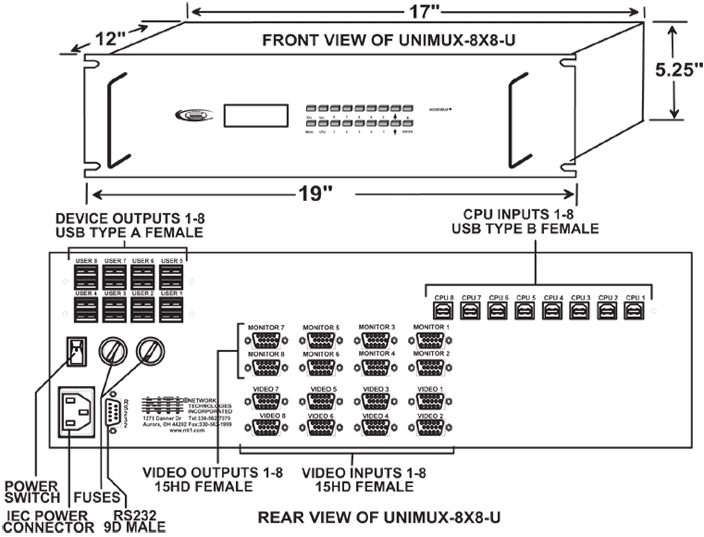
- Eight female 15-pin HD and eight female USB Type B connectors.
- Supports USB-enabled PC, SUN and MAC computers with VGA video.
- Multiplatform support: Windows 7/8/10/11, Windows Server 2008/2012/2016/2019/2022, Solaris, Linux, FreeBSD, and MAC OS 10/11/12/13.
- Supports MAC soft (keyboard) power-on.
- Any legacy SUN computer can be connected by using a USB-SUN-R adapter.
Monitor
- Crisp and clear 1920x1200 resolution.
- Eight Female 15-pin HD connectors.
- A multiscan VGA monitor is required to display the different video outputs from different platforms.
- Bandwidth is 150 MHz.
Cables
- Interface cables between your computers and the switch are required for proper operation. Use USBVEXT-xx-MM and standard interface cables to connect switches to computers.
- Cables not included.
Environmental
- Operating temperature: 32°F to 100°F (0°C to 38°C)
- Storage temperature: -22°F to 140°F (-30°C to 60°C)
- Operating and Storage Relative Humidity: 5 to 90% non-condensing RH.
Devices
- Eight sets of female USB Type A connectors for keyboards and mice.
- Compatible with most USB keyboards and mice, including Microsoft USB Intellimouse®, Logitech Cordless Elite Duo keyboard and mouse, Gyration keyboard/mouse, Crystal Vision keyboard with touchpad, and iKey DI-5K USB.
- Keyboard and mouse are hot-pluggable.
- USB MAC and SUN startup keys are supported on all platforms of input devices.
- Keystrokes are translated across platforms.
Power
- 100 to 240 VAC at 50 or 60 Hz
- Power consumption: 25W
- Add -48V5V10A, optional internal DC-DC converter to install the UNIMUX-8x8-U in a Telecom environment.
MTBF
- 41,112 hrs
Regulatory Approvals
- CE, RoHS
- TAA compliant
Warranty
- Two years
Compatible NTI Products
- Combine NTI emulators and switches for complex applications.
- VGA EDID Emulator (VGA-EDID-EMLTR2)
Keyboard
- Type <Ctrl> + <`> to go into Command Mode.
- Press <ESC> to leave Command Mode and return to Normal Mode.
- Use the keyboard to command the switchbox to select ports or configure the Scan, Sharing and Broadcast Modes.
- Normal Operating Mode allows the user to directly operate the selected computer with a transparent presence of the NTI switch.
- Sharing Mode allows users to share the same computer.
- Command Mode allows the user to give instructions to the switch through their keyboard. Keystrokes are not passed to the computer.
- Scan Mode feature causes the switch to automatically and sequentially display the video from each selected powered on computer for a duration of 2-255 seconds (programmable by the user).
- Broadcast Mode allows the user's keystrokes to be sent to all selected powered on computers.
RS232 Control
- Standard feature on the rackmount units.
- Control
- Female DB9 connector.
- Baud rate 300 through 9600, DIP switch selectable.
- Use DIP switches to address up to 15 units, all of which can be daisy-chained and controlled by one serial port.
- Seven segment displays show what input is connected to each output.
- Commands
- RS – causes switch to reset so that IN1 connects to OUT1, IN2 connects to OUT2.
- CS – causes one INx/OUTx connection to occur.
- CA – causes all inputs to connect to specified output.
- RO – reads what input is connected to specified output.
- RU – reads size of matrix, reports number of inputs and number of outputs on specified switch.
Front Panel Interface
- Locally change ports with front panel buttons.
- Use front panel buttons to move through LCD screens and execute actions.
- LCD indicates currently selected port for each user.
- Use buttons to configure RS232 control.
- Change baud rates for RS232.
On Screen Display (OSD)
- Standard feature on the rackmount units.
- Use keyboard or mouse to operate the switch from menus superimposed onto your monitor.
- Type <CONTROL> + <`> to activate OSD.
- Control, Scan, & Broadcast functions.
- View vital port information.
- Search for ports by name.
- Search Mode lets the user type in the first few letters of the computer's name and the OSD will locate it.
- Names can be up to 12 characters long.
- Shows names of computers on cascaded switches up to 128 ports.
- Displays the computer's platform next to its name.
- Modify the size and position of the OSD.
- Help Screens assist users with the OSD.
- OS- and software-independent.
- Our OSD comes built into your switch, so you do not have to install additional hardware or software.
- Security Features built into OSD
- Advanced security included with switch.
- Each user password & name can be up to 15 characters long, and each switch can store up to 63 users.
- Administrator can enable or disable all security features and select which computers each user can access.
- Once security is enabled, a user or administrator must "login" in order to access any of the computers connected to the switch.
Download Matrix Switcher Control Program
- Installation instructions - switch-control-program-install.txt (1.0 KB)
- Release notes - switch-control-program-rls (1.0 KB)
- Download switch control program installation - setup.zip (1.3 MB)
User Manual:
Data Sheet:
NTI Switch Control Program:
Knowledge Base:
Application Drawings
-
KVM Matrix Switch
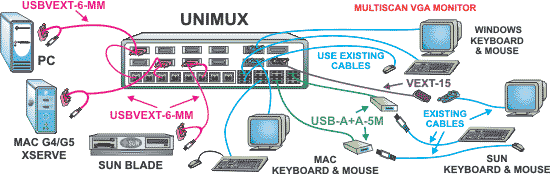 How to let up to eight users control 32 USB-enabled PC, SUN and MAC computers
Application Notes
-
Multiple Users Can Control Multiple USB Computers Located 1,000 Feet Away Using CAT5 UTP Cable.
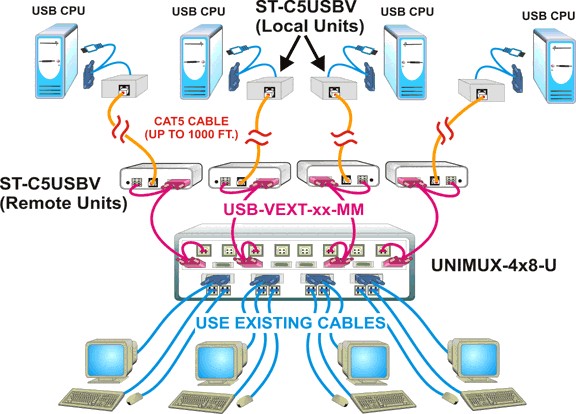 Interconnect the UNIMUX™ USB KVM Matrix Switch, UNIMUX-nXm-U, with XTENDEX® USB KVM Extenders via CAT5, ST-C5USBV, to allow up to eight users to individually command or simultaneously share up to 32 USB computers located up to 1,000 feet away using CAT5 UTP cable.
CAD Drawings
-
USB KVM Matrix Switch (UNIMUX-2X8-U)
-
USB KVM Matrix Switch (UNIMUX-4X16-U)
-
USB KVM Matrix Switch (UNIMUX-8X8-U)
-
"Paragon Technology Group is a residential systems integration company. We recently had an application that required us to control 3 computers from various locations in a home, being able to view the computer's displays on televisions. Our design consisted of RF keyboard/mouse combinations and NTI's UNIMUX-2X8-U, with the switching driven by a Crestron® control processor.
We were quite pleased to find that the setup worked flawlessly right out of the box. The Crestron control module we downloaded from the NTI website did not require any modification from our Crestron programmer. The setup works exactly as we expected it to, and we did not have to spend a lot of time debugging the gear to get it operational.
We will definitely use the UNIMUX™ USB Matrix KVM Switch in future installations!"Dutch HollandParagon Technology GroupBasalt, CO
Network Technologies Inc |
 |