VGA KVM Matrix Switch via CAT5

Consolidated control for multi-user, multi-rack server environment up to 1,000 feet away

Also known as: KVM Matrix Switch CAT5, multi-user multi-platform kvm switch, CAT5 KVM Server Switch, multiple users multiple computers

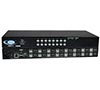
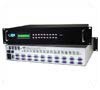
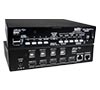
PRIMUX-16x64
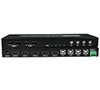
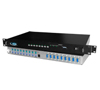
PRIMUX-16X64 (Front & Back)

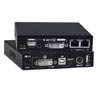
Additional Images

  • HA-UNV
  • HA-RS-M
  • HA-SUN
  • Designed and Manufactured in the U.S.A.

The PRIMUX® KVM Matrix Switch via CAT5 provides non-blocking access for up to 16 simultaneous users to up to 64 servers. The switch frees up valuable space by eliminating large KVM switchboxes and bulky hard-to-manage coax cables.

The PRIMUX system consists of three components: Matrix Switch, connects users to servers; Host Adapters, connect to each server; and User Stations, connect to each set of user-station equipment – keyboard, monitor and mouse. The User Stations and Host Adapters can be located as far as 1,000 feet from each other, and are connected to the matrix switch via CAT5/5e/6 UTP cable.

The PRIMUX® KVM Matrix Switch via CAT5 provides non-blocking access for up to 16 simultaneous users to up to 64 servers. The switch frees up valuable space by eliminating large KVM switchboxes and bulky hard-to-manage coax cables.

The PRIMUX system consists of three components: Matrix Switch, connects users to servers; Host Adapters, connect to each server; and User Stations, connect to each set of user-station equipment – keyboard, monitor and mouse. The User Stations and Host Adapters can be located as far as 1,000 feet from each other, and are connected to the matrix switch via CAT5/5e/6 UTP cable.

  • Multi-user, multi-platform, multi-rack access.
  • Platform-specific host adapters for host connection – PS/2, USB, SUN, Serial.
  • Simple plug-and-play auto-configured installation.
    • Servers are discovered as they are powered up, and can be accessed immediately by authorized users
  • Hot-swap components with no disruption of server operation.
  • Supports video resolutions to 1920x1440.
  • Automatically adjusts the video quality to compensate for varying lengths of CAT5/5e/6 cable.
  • Dedicated microprocessors prevent CPUs from locking up.
  • Real time power status of connected servers.
  • Command and control provided by OSD of connected User Station.
  • Flash upgradeable.

Matrix Switch

Connectors
  • Female RJ45 input/output connectors.
  • Female RJ45 Ethernet connector.
    • 10/100 BaseT Ethernet interface
  • Male DB9 connector
  • Female SCSI 68-pin connector
Power
  • 110 or 220 VAC at 50 or 60 Hz via IEC connector. (Country-specific power supply cable included.)
Environmental
  • Operating temperature: 32° to 100°F (0° to 38°C).
  • Storage temperature: -20° to 140°F (-30° to 60°C).
  • Operating and Storage Relative Humidity: 17 to 90% non-condensing RH.
MTBF
  • PRIMUX-8X32: 51,893 hrs
  • RIMUX-16X64: 37,822 hrs
Warranty
  • Two years

PRIMUX User Station Specifications

Distances and Resolutions for CAT5/5e/6 Cables
Cable Distance Resolution
CAT5/ CAT5e (UTP) 1000 feet (305 meters) 1024x768 at 60 Hz
700 feet (213 meters) 1280x1024 at 60 Hz
500 feet (152 meters) 1600x1200 at 60 Hz
400 feet (122 meters) 1920x1440 at 60 Hz
CAT6 (UTP) 800 feet (244 meters) 1024x768 at 60 Hz
600 feet (183 meters) 1280x1024 at 60 Hz
500 feet (152 meters) 1600x1200 at 60 Hz
350 feet (107 meters) 1920x1440 at 60 Hz

Host Adapters

Hosts
  • One platform-specific (USB + PS/2, SUN, Serial) HA-x host adapter is required for each computer.
  • HA-UNV
    • Compatible with PS/2 and USB computers with VGA video.
    • One male 15-pin HD, one male 6-pin miniDIN, and one male USB Type A connectors.
      • Includes female USB Type A to male 6-pin miniDIN adapter.
  • HA-SUN
    • Compatible with legacy SUN computers with VGA video.
    • One male 15-pin HD and one male 8-pin miniDIN connectors.
  • HA-RS-M
    • Compatible with most serial devices with an RS232 port.
    • One female RJ45 EIA-232 serial port connector.
    • Supported signals: TXD, RXD, DSR, DTR, CTS, RTS
    • Emulates an ASCII terminal – converts serial data from ASCII device into VGA video
Power
  • HA-UNV/HA-SUN: power provided by the host computer.
  • HA-RS-M: power provided by the host serial device via USB Type A connector.
Cables
  • Use CAT5/5e/6 UTP cable to connect Host Adapters and User Stations to the switch.
  • Cables not included.
Regulatory Approvals
  • RoHS
On Screen Display
  • Use keyboard or mouse to operate the switch from menus superimposed onto the monitor.
  • Displays the platform, name, and power status of the connected servers.
  • Allows color skew and video compensation fine tuning for optimal video quality.
  • Locate and select servers by name.
  • Names can be up to 16 characters long.
  • Help Screens assist users with OSD.
  • Modify the size and position of the OSD.
  • OS- and software-independent.
  • Various administrator configuration features, including users, servers and user stations.
    Security
    • Administrator can enable or disable all security features and select which servers each user can access.
    • Add or remove authorized users.
    • Set individual user names and passwords for each user.
Modes of Operation
  • Normal – a user connected to a host.
  • Scan – user is subsequently connected to hosts from a list.
  • Sharing – the administrator can select for each host a sharing attribute, which defines multiple user access to the host.
    • None (not shared) – one user is connected to the host and controls it. No other user may select nor control that host.
    • Limited (video shared) – one user is connected to and controls the host. Other users may select and see the video output from the host, but not control the host.
    • Full (shared) – a host may be selected by many users; the host is still controlled by one user, but its control may be given to any other user after an inactivity timeout (share idle time).
RS232
  • Configuration can be done through the serial port.
  • Baud rate: 115200.
Ethernet Control
  • Configuration can be done over the Internet via Telnet.
  • 10/100 BaseT Ethernet interface.

Application Drawings

  • VGA KVM Matrix Switch via CAT5
    VGA KVM Matrix Switch via CAT5 - Application Drawing
    How to control a multi-rack server environment containing 8 users

CAD Drawings

  • KVM Matrix Switch via CAT5 (PRIMUX-8X32)
    KVM Matrix Switch via CAT5 (PRIMUX-8X32)
  • KVM Matrix Switch via CAT5 (PRIMUX-16X64)
    KVM Matrix Switch via CAT5 (PRIMUX-16X64)

KVM Matrix Switch via CAT5 Models

NTI Part # # of Users # of CPU's Rack Size
WxDxH (in)
Power Cord Length Price Quote Buy
PRIMUX-8X32 8 32 19x12x1.75 $6,405.00
PRIMUX-16X64 16 64 19x12x3.5 $12,285.00

User Station

NTI Part # Description Size (In.)
WxDxH
Price Quote Buy
PRIMUX-UZR User Station 11x11x1.75 $710.00

Host Adapter Models

NTI Part # Platform Size (In.)
WxDxH
Price Quote Buy
HA-UNV USB + PS/2 1.5x3.0x0.8 $185.00
HA-SUN SUN 2.1x3.7x1 $220.00
HA-RS-M Serial RS232 1.5x3.0x0.8 $200.00