DVI Video Matrix Switch up to 32x32
Switch single link DVI-D video from many video sources among multiple displays.
DVI matrix switch, DVI router, video matrix switch, video router, routing switcher, video switch, video port router, multiplexer, matrix switch, video switch, video matrices.
Product Highlights
- WUXGA/1080p Video Resolutions
- 4x4, 8x8, 16x16 or 32x32

Additional Images
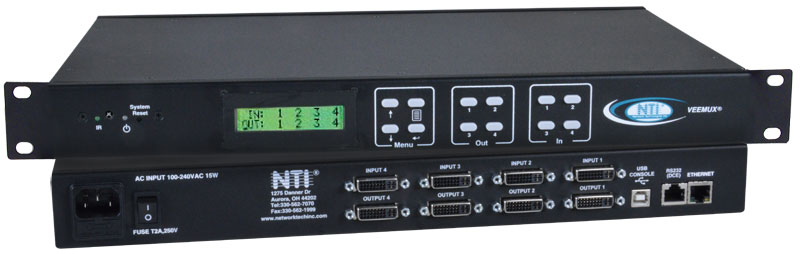
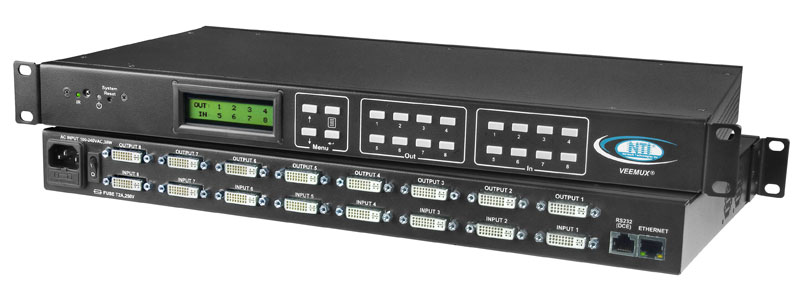
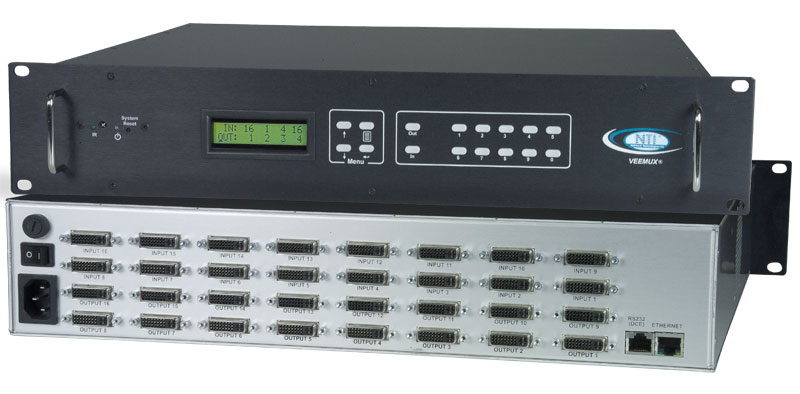
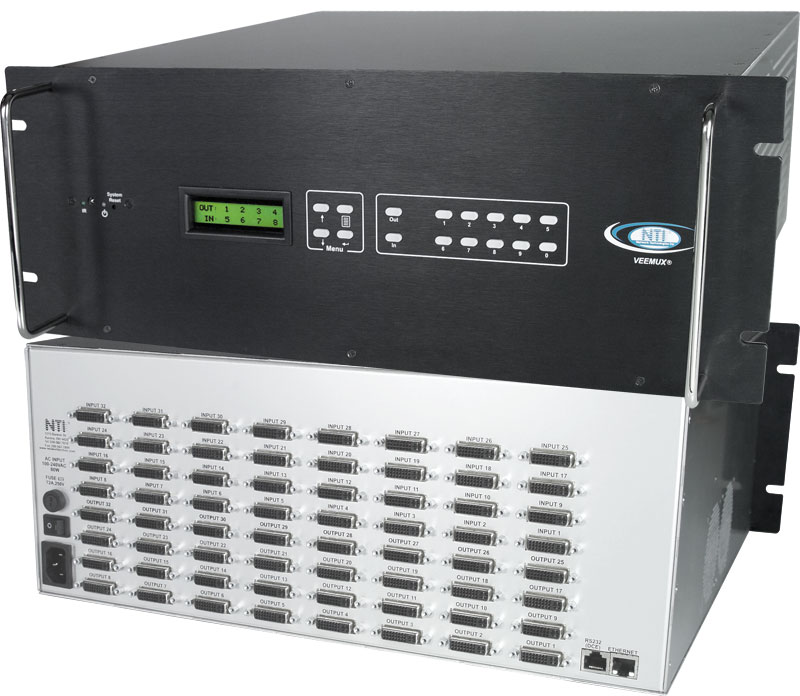
The VEEMUX® DVI Video Matrix Switch routes video from up to 32 single link digital DVI video sources (computers, DVD players, satellite receivers, etc.) to up to 32 displays (LCD monitors, Plasma screens, DLP HDTVs, projectors, etc.).
The VEEMUX® DVI Video Matrix Switch routes video from up to 32 single link digital DVI video sources (computers, DVD players, satellite receivers, etc.) to up to 32 displays (LCD monitors, Plasma screens, DLP HDTVs, projectors, etc.).
- Configure and control the switch through Ethernet, serial port, front panel buttons, or optional IR remote.
- Supports DVI-D interface for crisp and clear video quality on flat panel displays.
- Supports HDTV resolutions up to 1080p, and up to 1920x1200 (WUXGA).
- Passes HDMI audio and video signal through DVI-I port.
- Transmit audio and video over a single cable with the DVI-HD-xx-MM male DVI-D to male HDMI cable.
- Meets the electrostatic discharge (ESD) immunity requirements of IEC/EN 61000-4-2.
- Each output provides one video signal and one stereo audio signal (with audio option).
- Each input can be independently connected to any or all outputs.
- HDCP is supported when connecting any one input to any one output (4x4 and 8x8 models only).
- HDCP is not supported when connecting one input to multiple outputs.
- EDID learning for the support of any DVI display device.
- Built-in default EDID configuration tables for both PC and MAC.
- Dual default EDID configuration tables: high resolution without audio and TV resolution with audio.
- Optional 32x32 DVI Matrix Switch with internal 5V power supplies drives all connected ST-2FODVI-LC extenders on the output side.
- Connect up to 32 ST-2FODVI-LC extenders to the matrix switch to extend a DVI signal up to 4,920 feet away.
- Local extender unit is powered by the matrix switch — no power supply required.
- Connect up to 32 ST-2FODVI-LC extenders to the matrix switch to extend a DVI signal up to 4,920 feet away.
Video Input
- Female DVI-I connectors.
- Signal type: single link digital DVI.
- Compatible with computers and HDTV video sources (satellite receivers, DVD players, etc) with DVI video.
- Multiplatform support: Windows 7/8/10/11, Windows Server 2008/2012/2016/2019/2022, Linux, FreeBSD, and MAC OS 10/11/12/13.
Video Output
- Female DVI-I connectors.
- Signal type: single link digital DVI.
- Supports HDTV resolutions up to 1080p, and up to 1920x1200 (WUXGA).
- Video bandwidth: 1.65 Gbps
Protocols
- HTTP, HTTPS
- TCP/IP, DHCP, UDP, ARP, TLS v1.2
- IPV4
Power
- 100 to 240 VAC at 50 or 60 Hz via IEC connector. (Country-specific power supply cable included.)
- SM-32X32-DVI-LCD-5V16A: includes internal power supplies at the output side that will power any connected ST-2FODVI-LC local units.
- Max heat dissipation:
- SM-8X8-DVI-LCD: 16W
| NTI Part # | Watts |
|---|---|
| SM-4X4-DVI-LCD | 10 |
| SM-8X8-DVI-LCD | 20 |
| SM-16X16-DVI-LCD | 25 |
| SM-32X32-DVI-LCD | 45 |
Environmental
- Operating temperature: 32 to 104°F (0 to 40°C).
- Storage temperature: -22 to 140°F (-30 to 60°C).
- Operating and Storage Relative Humidity: 5 to 90% non-condensing RH.
Dimensions
- SM-4X4-DVI-LCD WxDxH (in):
- 16.19x10.00x1.75 (without supplied rackmount kit)
- 19x10.00x1.75 (with supplied rackmount kit)
- SM-8X8-DVI-LCD WxDxH (in):
- 17.40x10.00x1.75 (without supplied rackmount kit)
- 19x10.00x1.75 (with supplied rackmount kit)
- SM-16X16-DVI-LCD WxDxH (in): 19x16.17x3.5
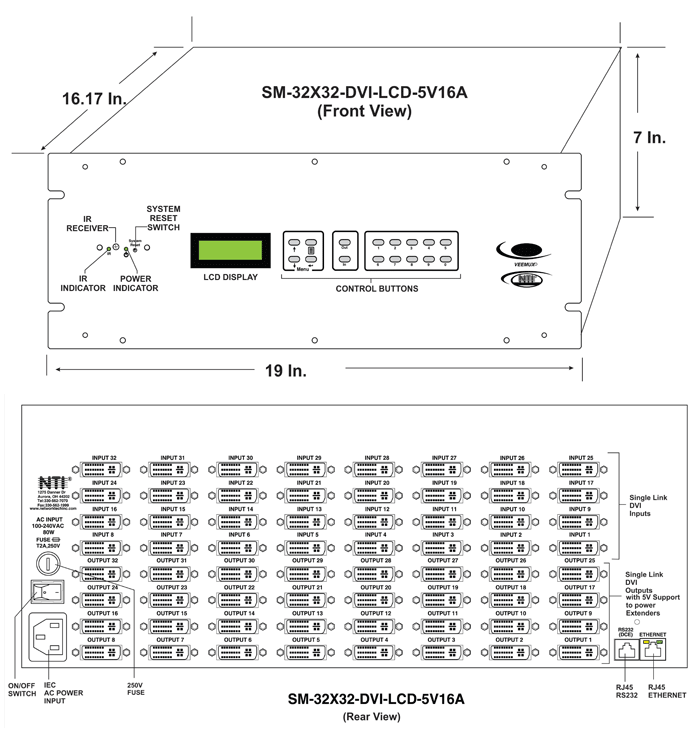
- SM-32X32-DVI-LCD WxDxH (in): 19x16.17x7
- SM-32X32-DVI-LCD-5V16A WxDxH (in): 19x21.17x7
Cables
- Interface cables between the video sources/displays and the switch are required for proper operation.
- Note: DVI and HDMI passive cables longer than 15 feet may provide poor video performance with this switch depending on the cable quality and display quality. The switch supports passive cable lengths up to 75 feet on the output side.
- Use active cables to extend up to 100 feet.
- Use DVI-IS-xx-MM or DVI-HD-xM-MM cables to connect a DVI or HDMI source or display up to 15 feet away from the switch.
- Use HD-xx-MM HDMI cables with HDMIF-DVIDM adapters to connect an HDMI source up to 15 feet and an HDMI display up to 75 feet away from the switch.
- Use HD-ACT-xx-MM HDMI Active Cables with
HDMIF-DVIDM adapters to connect an HDMI source or display up to 100 feet. - Use DP-DVID-xx-MM cables to connect a DisplayPort source up to 15 feet away from the switch.
- Cables not included.
| NTI Part # | Hours |
|---|---|
| SM-4X4-DVI-LCD | 74,502 |
| SM-8X8-DVI-LCD | 90,801 |
| SM-16X16-DVI-LCD | 48,326 |
| SM-32X32-DVI-LCD | 35,727 |
Regulatory Approvals
- CE, RoHS
- TAA compliant
Warranty
- Two years
Compatible NTI Products
- Combine NTI's extenders, switches, splitters and cables for complex applications
- HDMI Quad Screen Splitter/Multiviwer
(SPLITMUX-HD-4RT) - HDMI Active Cables with Built-In Signal Booster (HD-ACT-xx-MM)
- DVI-I Single Link Interface Cable (DVI-IS-xx-MM)
- DVI-D to HDMI Single Link Interface Cable (DVI-HD-xx-MM)
- Embedded audio will pass through the switch (with or without optional stereo audio) when an HDMI source is connected using DVI-HD-xx-MM.
- DVI Extender via Fiber Optic Cable (ST-2FODVI-LC)
- Embedded audio will pass through the switch and extender if an HDMI source is connected using an HDMI to DVI adapter.
- DVI Video Splitter (VOPEX-DVI-x)
- DVI/VGA Quad Screen Multiviewer (SPLITMUX-DVI-4)
- Screen Splitter / Video Wall Processor (SPLITMUX-SVDVI-4)
- HDMI HDBase-T Extender via One CAT5e/6 (ST-C6HD-HDBT)
- Mini HDMI Extender via Two CAT5e/6/6a
(ST-C5HD-MINI-ULC)- Only compatible for DVI input extensions with the DVI Matrix Switch.
- DisplayPort Male to DVI-I Female Adapter Cable
(DPM-DVIIF-CBL) - DisplayPort to DVI-D Interface Cables (DP-DVID-xx-MM)
- HDMI Quad Screen Splitter/Multiviwer
Ethernet Control
- Standard control method.
- Configuration can be done over the Internet via Web server or Telnet.
- Female RJ45 connector.
- 10/100 BaseT Ethernet interface.
-
Web Server (view product demo)
- Security is ensured by password and user configurable timeout.
- Up to 25 users can access the web page at one time.
- The user can access the following pages:
- Switch page: allows the user to connect any input to any output, save and recall up to ten connections.
- Administration pages: administrator can access pages for system configuration, network configuration, naming video inputs/outputs, scanning sequence, DDC options, changing password, and updating firmware.
- Standby Mode page: allows the user to quickly place the switch in standby mode.
- Support page: provides links to the product manual and firmware downloads webpage.
- Reboot page: allows the user to quickly reboot the switch.
-
Telnet
- Security is ensured by password.
- Up to 25 users can access the telnet connection at one time.
- Commands are similar to RS232 commands.
- The telnet server listens on ports 2000 and 2005.
- Port 2000 is for an operator telnet session.
- Port 2005 is intended for a software control type session using raw TCP communication.
-
Front Panel Interface
- Standard control method
- Configuration and control can be done using the front panel buttons.
- Keypad allows selection of the input source to be routed to the desired outputs.
RS232 Control
- Standard control method
- Configuration and control can be done through the serial port.
- 4x4 switches: female RJ45 connector or female USB Type B connector.
- 8x8, 16x16, 32x32 switches: female RJ45 connector.
- Control the switch using the NTI Switch Control Program with Graphical User Interface (GUI control) via RS232.
Infrared Remote Control
- Optional control method.
- IRT-UNV is sold separately.
- Transmitter can be up to 30 feet (9.1 meters) away.
- Control up to 15 switches with one remote.
- Power: Two AAA batteries (included).
User Manual:
Data Sheet:
Certificate of Volatility:
Product Demo:
3D Model:
- SM-8X8-DVI-LCD.step – 3D image file
- SM-16X16-DVI-LCD.step – 3D image file
- SM-32X32-DVI-LCD.step – 3D image file
2D CAD Drawing:
Firmware:
Application Drawings
-
DVI Video Matrix Switch
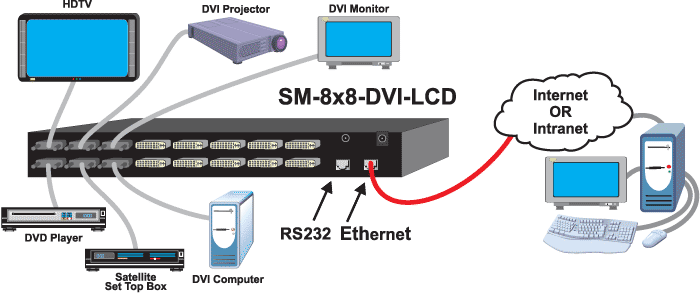 How to switch single link digital DVI video from many video sources among multiple displays
Application Notes
-
How to Switch Up to 32 Inputs into 1 Quad Screen Multiviewer
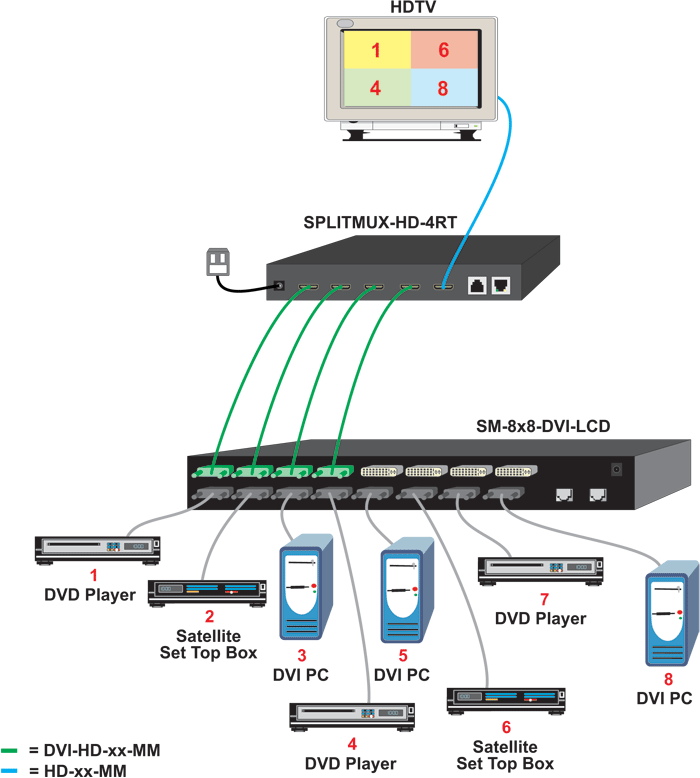 The HDMI Quad Screen Splitter/Multiviewer (SPLITMUX-HD-4RT) can be used with the DVI Matrix Switch to allow a selection of 4 sources out of up to 32 inputs to be displayed on the multiviewer output. Multiple DVI sources are connected to the input of the DVI Matrix Switch. A DVI to HDMI cable (DVI-HD-xx-MM) cable is required to connect four DVI Matrix Switch outputs to the Multiviewer inputs, and the Multiviewer output is connected to a single display.
With this configuration, up to 32 DVI sources can be switched to the four Multiviewer inputs that will be displayed on a single monitor. In the diagram example, source 1, 4, 6, and 8 have been switched to feed to DVI Matrix Switch outputs 1-4, and they are displayed in quadrants on the single display. -
How to Connect, Switch, and Extend HDMI Sources and Displays with Embedded Audio
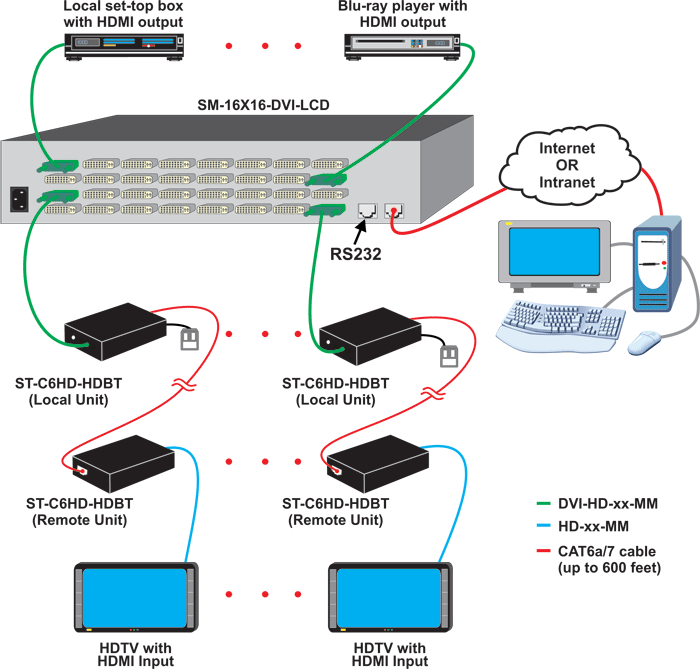 The SM-nXm-DVI-LCD is able to transmit HDMI audio and video using the DVI-HD-xx-MM male DVI-D to male HDMI cable. As the embedded audio will pass through the switch with this cable, both audio and non-audio versions of the matrix switch can be used.
The output signal can be extended using the HDMI HDBase-T Extender (ST-C6HD-HDBT) to up to 600 feet away over CAT6a/7 solid cable. Only one power supply is necessary to power both the local and remote units. -
How to Connect 32 ST-2FODVI-LC DVI Extenders to the DVI Matrix Switch Outputs and Eliminate All Local Unit Power Supplies
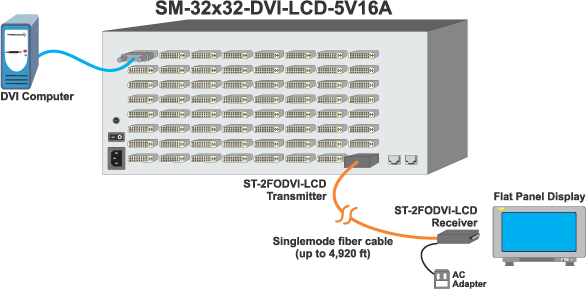
The SM-32X32-DVI-LCD-5V16A features internal power supplies that provide 5VDC power to all outputs on the matrix switch. This enables the switch to power all connected ST-2FODVI-LC local units, eliminating the need to connect a power supply to each local unit. Instead, only one power supply at each remote unit is required. Up to 32 ST-2FODVI-LC extenders can be connected to the matrix switch to extend DVI signals up to 4,920 feet away.
CAD Drawings
-
SM-32X32-DVI-LCD-5V16A
-
"We are using the NTI VEEMUX® SM-8X8-DVI-LCD DVI switcher to switch between 4 Mac Pro towers, an SDI to DVI converter, a Blu-ray Disc player, and laptop via a Denon AVR receiver in a high-end Dolby Atmos Dub stage that I designed and co-integrated with Dolby Laboratories. The NTI matrix switcher is controlled via a custom-designed AMX panel user-interface, which I also designed. The matrix switcher is also going to a multiviewer, because the dub stage also serves as a sound classroom. The SM-8X8-DVI-LCD has proven to be reliable and very configurable. I also love the web GUI for its informational feedback."
Buddy H.School of Cinematic Arts, University of Southern CaliforniaLos Angeles, CA -
"We are very happy with the purchase of the SM-32X32-DVI-LCD matrix switch. We are currently using it to route 12 different inputs to 19 different outputs. The web portal really makes setting up how the different inputs get mapped really easy."
Samuel C.Clemson UniversityClemson, SC -
"I have ordered and installed a couple of the SM-8X8-DVI-LCD video matrix switches now. In both project cases, the schools felt the product was a great fit for classroom training because they needed to show different functions to discuss, such as Radar, Conning, ECDIS, Power Point Presentations, etc. The VEEMUX video matrix switch made it easy for the instructor and lab lecturer to discuss different topics."
Bob M.NavSim Services IncBuffalo, NY
Network Technologies Inc |
 |