Video Multiviewers
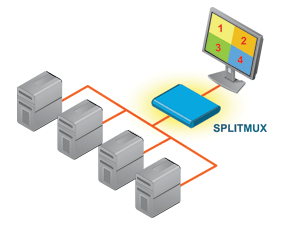 |
Simultaneously display video from multiple sources on a single display.
|
Multiviewer Video Type: 4K HDMI | 1080p HDMI | SDI
4K 18Gbps HDMI Quad Screen Splitter/Multiviewer
$3,135 - $6,270The SPLITMUX® 4K 18Gbps HDMI Quad Screen Multiviewer allows video from four different HDMI 2.0 Ultra-HD 4Kx2K 60Hz sources to be simultaneously displayed in real-time on a single monitor. It is capable of displaying the HDMI 2.0 video signals in quad, PiP, full, or custom mode. The multiviewer supports input/output resolutions up to Ultra-HD 4Kx2K (3840x2160 and 4096x2160 @24/30/60Hz YUV 4:4:4) in all display modes with independent video in to video out resolution. |
4K 18Gbps HDMI Quad Screen Splitter/Multiviewer with Built-In USB KVM Switch
$3,410 - $6,820The SPLITMUX® 4K 18Gbps HDMI Quad Screen Splitter/Multiviewer with Built-In USB KVM Switch allows video from four different HDMI 2.0 Ultra-HD 4Kx2K 60Hz computers to be simultaneously displayed on a single monitor. Additionally, it can switch one of the four attached computers to a shared keyboard and mouse for operation and to two additional USB devices. It is capable of displaying the HDMI 2.0 video signals in quad, PiP, full, or custom mode. The multiviewer supports input/output resolutions up to Ultra-HD 4Kx2K (3840x2160 and 4096x2160 @24/30/60Hz YUV 4:4:4) in all display modes with independent video in to video out resolution. |
Low-Cost 4K 6.75Gbps HDMI Quad Screen Splitter/Multiviewer
$460Part #: SPLITMUX-4K6GB-4LCThe SPLITMUX® Low-Cost 4K HDMI Quad Screen Multiviewer allows Ultra-HD 4Kx2K 30Hz video from four different sources to be simultaneously displayed on a single HDMI monitor in real time. It is capable of displaying the video signals in quad, dual, PiP, or full screen mode. |
4x4 HDMI Multiviewer / Video Matrix Switch / Video Wall Processor
$2,160Part #: SPLITMUX-4X4-HDVWCThe SPLITMUX® 4x4 HDMI Quad Screen Multiviewer is a multi-purpose high-speed video processing system that can be configured for three different output modes. In Multiview Mode, it is capable of displaying the four video sources in quad, PiP, or full screen display modes, with all four monitors simultaneously displaying the same image. In Matrix Mode, digital HDMI video and audio signals are routed from four HDMI video sources to four displays. In Video Wall Mode, video from a single source is displayed across all four monitors (2x2 video wall). |
3G-SDI Screen Splitter/Multiviewer, 9-Port
$3,300Part #: SPLITMUX-3GSDI-9The SPLITMUX® 3G/HD/SD-SDI Screen Splitter/Multiviewer allows video from up to nine different SDI sources to be simultaneously displayed in real-time on a single monitor. It is capable of displaying the video sources in full screen, quad screen mode, 9-picture screen mode, or custom mode on one HDMI monitor and one SDI monitor at the same time. In custom display mode, each picture can be adjusted to any size and positioned to any location on the display, such as to mimic Picture-in-Picture, dual screen, or triple screen display modes. |
Network Technologies Inc |
 |