Small Enterprise Environment Monitoring System
SNMP and Web monitoring/management of server room environments. Provides early warnings before critical events turn into disaster.
Also known as: Remote Server Environment Monitoring System, EMS, monitor network closet, data center thermometer, web alert thermometers temperature humidity IP sensor reading, computer rooms temperature alert, tcp/ip temp probe.
Additional Images



Product Highlights
- Configure Smart Alerts for different event combinations
- 2 external configurable sensors, 5 digital inputs, 1 output relay
- User-programmable IP camera snapshots
- Optional back-up battery, Power over Ethernet (POE), or 24VDC/48VDC power
- Linux inside
- Cascade up to 5 units via Ethernet connection (1 master, 4 slaves)
Compatible Sensors & Accessories
The ENVIROMUX® Small Enterprise Environment Monitoring System (EMS) monitors critical environmental conditions (such as temperature, humidity, and water leakage) that could destroy network components in your server room. When a sensor goes out of range of a configurable threshold, the system will notify you via email, SNMP traps, web-page alerts, a visual indicator (red LED), voice phone calls (via Automatic Voice Dialer System), and SMS messages (via email-to-SMS or external USB modem).
The system supports two external configurable sensors, five digital input sensors, and one output relay for control of external devices.
The ENVIROMUX® Small Enterprise Environment Monitoring System (EMS) monitors critical environmental conditions (such as temperature, humidity, and water leakage) that could destroy network components in your server room. When a sensor goes out of range of a configurable threshold, the system will notify you via email, SNMP traps, web-page alerts, a visual indicator (red LED), voice phone calls (via Automatic Voice Dialer System), and SMS messages (via email-to-SMS or external USB modem).
The system supports two external configurable sensors, five digital input sensors, and one output relay for control of external devices.
- Monitor and manage server room environmental conditions over IP.
- Sensors supported by a single E-2D:
- 2 external configurable sensors
- 5 digital inputs sensitive to contact closure
- 8 Remote Temperature/Humidity Sensors over IP
- E-MICRO-TRH(P): 1 integrated temperature/humidity combination sensor, 2 RJ45 ports for external temperature/humidity sensors, 2 digital inputs sensitive to contact closure, optional built-in Power over Ethernet (POE), dual DC power.
- 4 Remote 1-Wire Sensors over IP
- E-1W(P): 2 RJ11 connectors for daisy chaining many 1-wire temperature/humidity/dew point, thermocouple, or digital input expanders in any combination (up to 24 single-reading 1-wire sensors); 2 digital inputs sensitive to contact closure; dual DC power; optional Power over Ethernet (POE).
- 2 Remote Power Reboot Switches over IP
- PWR-RMT-RBT-C13: AC relay with IEC 320 C13 receptacle for controlling a device load of up to 15 Amps at 105-125 VAC or 10 Amps at 210-240 VAC, 2 digital inputs sensitive to contact closure, 2 digital open collector outputs for control of external devices.
- When using all three types of IP sensors with the E-2D, the system can support 3 E-MICRO, 3 E-1W, and 2
PWR-RMT-RBT-C13.
- Use an RJ45 RS485 Sensor Expander to add 8 RJ45 RS485 sensors.
- Use a Digital Input/Output Expander to add 16 digital inputs and 16 digital outputs.
- One output relay for control of external devices.
- Relay activates upon alarm or via the user interface.
- Control output relays via SNMP SET commands to power on/off external devices.
- Supports NTI's IP network video cameras for live view of any facility.
- One integrated view – see different Web cameras side-by-side with physical and environmental parameters.
- Any programmed event can trigger a snapshot from an IP camera.
- Monitor (ping) up to 64 IP network devices.
- Alerts are sent if devices are not responding.
- Linux inside.
- Create multiple alerts for any installed sensor.
- Sensor conditions (events) can be configured to trigger alerts by themselves, and/or be used in combination with other events to trigger Smart Alerts.
- Configure up to 50 events.
- Setup SSH commands to be sent when events are triggered to soft shutdown or reboot machines.
- Up to 20 Smart Alerts can be configured to use different event combinations to send alert messages.
- Configure up to 50 events.
- Alerts are posted in message log, which is accessible through Web user interface.
- Automatically configures network settings received from a connected DHCP server.
- If a DHCP server is not found, the default static IP address will be used.
- Integrates with various Open Source monitoring packages – Nagios and MRTG.
- The unit can be polled via SNMP.
- Two USB ports for connecting USB modem or for downloading log data to USB flash drive, and one USB console port for serial terminal interface.
- Available with optional internal battery backup.
- Alerts are sent when there is a power outage and when power returns.
- Available with optional 24VDC or 48VDC power, or optional built-in Power over Ethernet (PoE).
- Up to five units can be used together to increase the number of sensors connected.
- Cascade up to four E-2D/5D/16D units as slaves to one E-2D/5D/16D master unit via Ethernet connection.
- Each master and slave unit needs its own unique IP address.
- Uses a single Web interface for all systems/sensors connected.
- Cascade up to four E-2D/5D/16D units as slaves to one E-2D/5D/16D master unit via Ethernet connection.
- Dual redundant power supplies for connection to two separate power sources.
- The second power supply is sold separately.
- Optional industrial small environment monitoring system for high temperature environments. This industrial system has the ability to operate and monitor in harsh environments at high temperatures up to 167°F (75°C).
- Optional Self-Hosted Enterprise Environment Monitoring System Management Software for monitoring and configuring up to 3,000 E-2D/5D/16D/MICRO/1W devices and all connected sensors. Access from anywhere using a web browser on a computer, smartphone, and/or tablet. No clients or special apps to install.
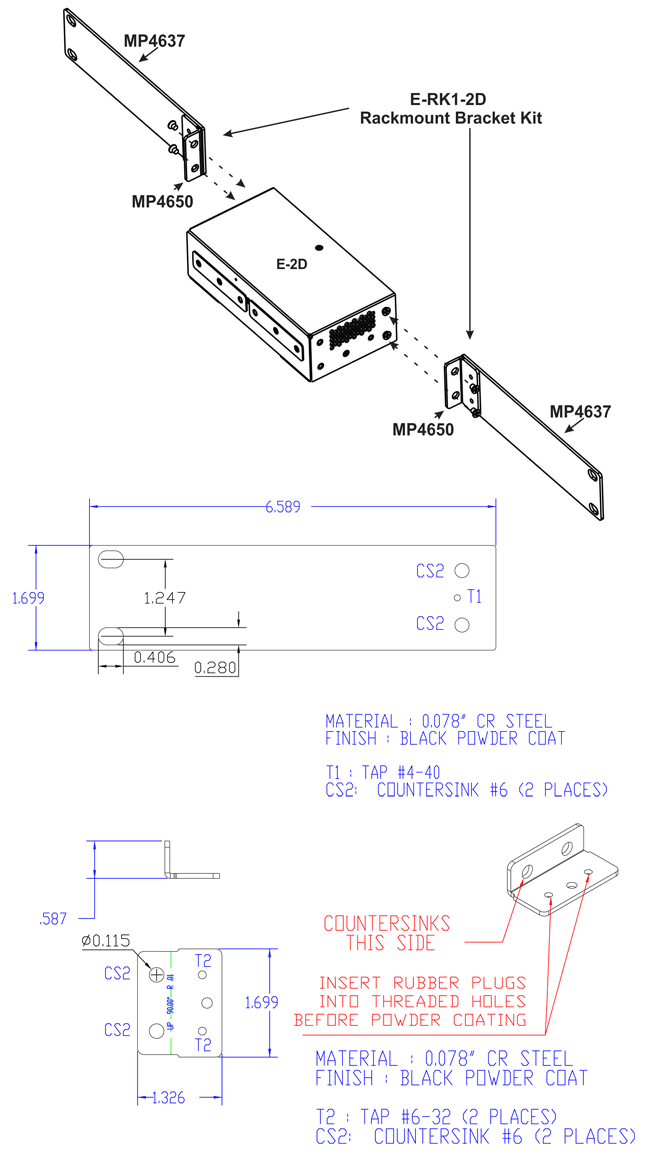
- Flexible Zero-RU mounting.
- Mounting tabs included.
- Optional 1RU rackmount kit available; the ENVIROMUX unit can be mounted with the front or rear facing out.
- Optional DIN mounting available.
- Security: HTTPS, SSHv2, SSLv3, IP Filtering, LDAPv3, AES 256-bit encryption, 16-character username/password authentication, user account restricted access rights.
- Multi-language support – English, German, Chinese, and Japanese.
- Use in data centers, co-lo sites, web hosting facilities, telecom switching sites, POP sites, server closets, or any unmanned area that needs to be monitored.
- Use the E-2D with a wireless router and Wi-Fi Range Extender to create a Wireless Environment Monitoring System.
- Configure, monitor, and receive alerts without the use of a wired network connection.
RJ45 Sensor Ports
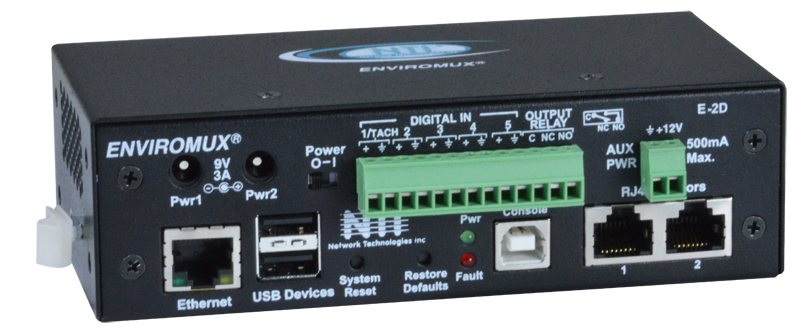
- Two female RJ45 jacks for connecting NTI temperature, humidity, liquid detection, smoke detection, glass break, vibration, motion sensors, and more.
- Two levels of user-defined alerts – non-critical and critical.
- Provides +12 VDC, 100 mA for each port.
Dry Contact Closures
- Five screw terminal pairs for connecting dry contact devices and the liquid detection sensor.
- Potential-free.
- Output voltage: +5 V DC
- Current limited to 10 mA
- Maximum resistance to close contact: 300K Ohm
Output Relay
- One screw terminal pair.
- Potential-free relay switch contacts.
- Normally open / normally closed connection points.
- Maximum switching load: 1A at 125VAC or 30VDC.
USB Ports
- Two female USB Type A connectors for connecting USB modem or for downloading log data to USB flash drive.
- One female USB Type B connector for connecting a PC for serial terminal access.
Ethernet Port
- One female RJ45 connector.
- 10/100 Base-T Ethernet interface.
- Supports full- and half-duplex.
Power Output
- AUX Power
- One screw terminal pair.
- Provides +12 VDC, 500 mA.
Optional Back-Up Battery
- Rechargeable sealed lithium battery.
- Provides back-up for two hours.
Protocols
- HTTP/HTTPS, SNMP V1/V2c/V3, SMTP, TCP/IP, Syslog, SNTP, DHCP, SSHv2, SSLv3, TLS v1.2, LDAPv3, XOAUTH2, AES 256-bit, 3DES, Blowfish, RSA, EDH-RSA, Arcfour, IPV6, WAP 2.0, RADIUS
- Support for XOAUTH2 provides higher security authentication for email accounts (e.g. Gmail).
- Compatible with any SNMP management software.
- The unit can be polled via SNMP.
- Operates and configures via HTTP/HTTPS web page, Telnet, SSH, or USB serial interface.
- Supports Internet Explorer 6.0 and higher, Firefox 1.5 and higher, Netscape 9, Google Chrome, Safari 1.3 and higher for MAC, and Safari 3.0 and higher for PC.
- Multiplatform support: Windows 7/8/10/11, Windows Server 2008/2012/2016/2019/2022, Solaris, Linux, FreeBSD, and MAC OS 10/11/12.
- An IP address can be assigned to the E-2D automatically by a DHCP server.
- Generates SNMP traps, email alerts, syslog messages, and SMS messages (via USB 3G modem).
- Alerts are posted in event log, which is accessible through Web user interface.
- Email alerts can be sent to 17 addresses.
- Supports HTTP REST API to poll sensor data with response in JSON format.
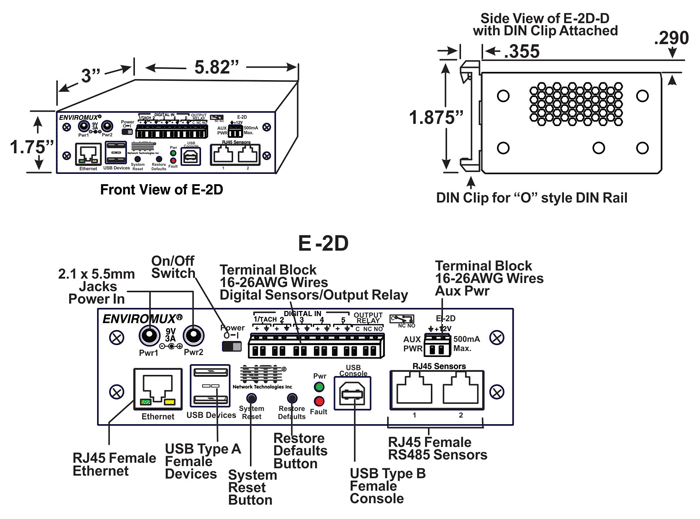
Dimensions
- WxDxH:
- E-2D, E-2DB, E-2D-IND, E-2D-POE: 5.82x3x1.75 in (148x76x44 mm)
- E-2D-D, E-2DB-D: 5.82x3.3x1.75 in (148x84x44 mm)
- E-2D-24V, E-2D-48V: 10.63x3.11x1.75 in (270x79x44 mm)
- Optional 1RU rackmount kit available.
- The ENVIROMUX system can be mounted so that the sensor connectors are facing the front or back of the rack.
Weight
- E-2D: 1.0 lb (0.45 kg)
Power
- Dual DC power.
- If the first power source fails, the unit will automatically, without interruption, switch over to the second power source before switching to the optional battery backup.
- Input: 100 to 240 VAC at 50 or 60 Hz via AC adapter.
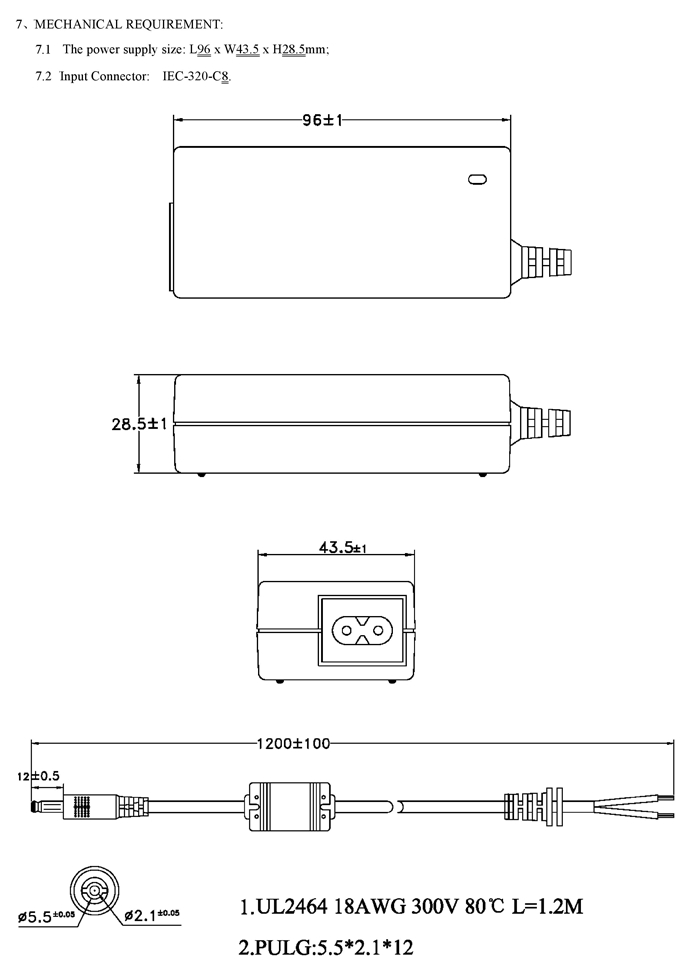
- Includes one 9VDC, 3A country-specific AC adapter. The second AC adapter is sold separately.
- Voltage output: 9-12VDC
- Power consumption: 10W.
- Optional built-in Power over Ethernet (PoE)
- Power over Ethernet standards supported: IEEE 802.3af, 802.3at.
- Proprietary schemes such as Cisco Discovery Protocol are not supported.
- Similar legacy switches and routers will have to use PWR-SPLY-9V3A
- Proprietary schemes such as Cisco Discovery Protocol are not supported.
- If the Power over Ethernet source fails, the unit will automatically, without interruption, switch over to the DC power source.
- Power over Ethernet standards supported: IEEE 802.3af, 802.3at.
- Optional 24VDC power.
- Accepts 9~36VDC (24VDC nominal).
- For installation in a 24V Telecom environment.
- Optional 48VDC power.
- Accepts 18~72VDC (48VDC nominal).
- Use the PWR-48V-12V1-6A DC-DC power converter to install the E-2D in a 48V or 24V Telecom environment.
MTBF
- E-2D: 229,580 hours.
- E-2DB: 230,693 hours.
Environmental
- Operating temperature:
- E-2D: 32 to 140°F (0 to 60°C)
- E-2D-IND: -4 to 167°F (-20 to 75°C)
- Storage temperature: -22 to 140°F (-30 to 60°C).
- Operating/Storage Relative Humidity: 5 to 90% non-condensing RH.
Regulatory Approvals
- CE, RoHS
- EN51055, EN50121-3-2
Warranty
- Two years
Web Interface (view product demo)
- Configuration can be done over the Internet/LAN or 3G data connection via Web page.
- 3G data connection requires a USB 3G modem with a data plan.
- Email and SMS alerts can be sent through the modem instead of the Ethernet connection.
- 3G data connection requires a USB 3G modem with a data plan.
- Supports Internet Explorer 6.0 and higher, Firefox 1.5 and higher, Netscape 9, Google Chrome, Safari 1.3 and higher for MAC, and Safari 3.0 and higher for PC.
- Configure sensor's thresholds, alarm methods, formats of alerts, and system data log.
- Customize SMS messages and email subject headers for sensor alerts.
- View/edit sensors' current values, thresholds and alert statuses.
- All sensors connected, including up to 8 Remote Temperature/Humidity Sensors over IP, to the E-2D can be viewed on one summary page.
- All sensors in alert can be quickly viewed on the alert summary page to enable timely responses.
- User configurable settings allow sensors to return to normal status when alert condition clears, without manually acknowledging/dismissing the alert.
- View/edit entries stored in the system logs.
- Event log records system events such as alerts, user login/logout, failed email messages, etc.
- Data log records samples of sensor readings. User specified sampling time period.
- Up to 1,724 data log entries and 1,000 event log entries are stored.
- The log can be downloaded as a tab-delimited plain text file.
- Configure IP information (address, subnet mask, default gateway, DNS, etc.), user administrative settings, and data logging settings.
- Upload custom x509 certificates.
- Up to 16 users can access the web page at one time.
- Configure up to 50 sensor conditions (events)
- Configure up to 20 Smart Alerts to use different event combinations to send alert messages.
- Up to five units can be used together to increase the number of sensors connected.
- Cascade up to four E-2D/5D/16D units as slaves to one E-2D/5D/16D master unit via Ethernet connection.
- Each master and slave unit needs its own unique IP address.
- IP sensors can only be connected to a master unit.
- Uses a single Web interface for all systems/sensors connected.
- Cascade up to four E-2D/5D/16D units as slaves to one E-2D/5D/16D master unit via Ethernet connection.
- Multi-language support – English, German, Chinese, and Japanese.
Front Panel Interface
- LEDs indicate the following:
- "Fault" (red) lights up if a sensor goes out of range of a configurable threshold.
- "Power" (green) lights up when the device is powered.
- Restore Defaults button – use to manually restore the E-2D back to factory settings.
- System Reset button – use to manually reboot/restart the firmware for the E-2D.
USB Serial Interface / Telnet / SSH
- Configure, control and monitor over the text-based menu system accessible via USB console port, Telnet, and SSH.
- Access is controlled via username/password.
- System stores encrypted login information.
- Two user levels: user and administrator.
- Multi-language support – English, German, Chinese, and Japanese.
- Telnet and SSH can be enabled or disabled.
- Network Security Enhancement: Disabling Telnet can prevent unsecure text menu access to the E-2D.
Network Operation
- Automatically configures network settings received from a connected DHCP server.
- If a DHCP server is not found, the default static IP address will be used.
- SNMP support, allowing integration into network management platforms.
- Control output relays via SNMP SET commands to power on/off external devices.
- SET command can be sent from SNMP software, MIB browser (Windows), or command line (Linux).
- Control output relays via SNMP SET commands to power on/off external devices.
- Updating the system firmware.
Mobile Summary Page (view product demo)
- View summary page on mobile devices – smartphones, tablets, etc.
- Summary page lists all connected sensors' current values and alert statuses.
Open Source Monitoring Integration
Optional Management Software
- Optional intuitive graphical management software
(E-MNG-SH) provides an easy-to-use, unified interface for both monitoring and configuring up to 3,000 ENVIROMUX units and all connected sensors.- Access from anywhere using a web browser on a computer, smartphone, and/or tablet.
- Self-hosted software – no clients or special apps to install.
- Push configuration changes to multiple connected units in a group at once.
- E.g. new users, mail server, network settings, security settings, system settings, etc.
Sensors & Accessories - Sold Separately
Environmental Sensors
- Remote Temperature/Humidity Sensor over IP
- Temperature Sensors
- RTD Temperature Transmitters/Sensors
- Temperature/Humidity Sensors
- Industrial Temperature/Humidity Sensors
- Rope-Style Leak Detectors
- Leak Location Detection Sensors
- Spot Leak Detectors
- Under Carpet & Tape-Style Detectors
- Liquid Level Float Switches
- Ultrasonic Level Transmitter
- Water Flow Sensors
- Smoke Detectors
- Gas Detectors
- Dust Detectors
- Air Flow/Velocity Detectors
- Outdoor Temperature Sensor
- Wind Speed Sensor
- Barometric Pressure Transmitter
- Pressure Sensors
- Noise Level Sensor
Power Relays & Sensors
Security Sensors & Access Control
- Door Contact Sensors
- Vibration & Glass Break Sensors
- Motion Sensors
- Tamper Switch
- Emergency/Panic Button
- Light Intensity Sensor
- Access Control
Alert & Communication Accessories
Sensor Accessories
- Programmable LED Sensor Display
- RJ45 RS485 Sensor Expander
- Digital Input/Output Expanders
- RS485/RS232/RS422 to Fiber Converter/Extender
- Sensor Converters – 4-20mA, 5VDC
- WiFi Range Extender
- Sensor Cables
- Surge Protectors
- Intrinsically Safe Barrier
Optional Replacement Back-up Battery
User Manual:
- E-2D – Installation and Operation Manual
- E-2D – Quick Installation Guide
- Serial Control Manual
- MK-DIN-E2D5DLXO – Installation Manual
Data Sheet:
How To:
- How to Harden E-xD Settings
- Configure Router for Remote Access to ENVIROMUX
- Locating OIDs Using a MIB Browser
- How to Send SMS Messages to 18-34 Users
- How to Install Console Drivers on Windows 8 Computer for E-2D
- How to Use LDAP Server with the E-2D
- How To Setup Syslog in an ENVIROMUX Enterprise Environment Monitoring System
- How to Create an x.509 Certificate
- How to Install E-LD to E-xD Using Connection to USB Console
- How to remove and dispose back-up battery in E-2DB
Firmware:
- Download new firmware and MIB files
*For Rev C models only (features two power inputs)
3D Model:
- E-2D.step - 3D image file
Stencil Drawing:
Product Demo:
Knowledge Base:
Application Drawings
-
Small Enterprise Environment Monitoring System
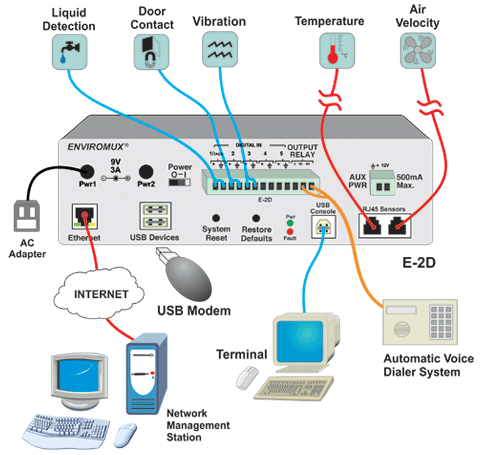 How to monitor environmental conditions using the E-2D
Application Notes
-
How to Connect Remote Temperature/Humidity Sensors over IP to the E-2D
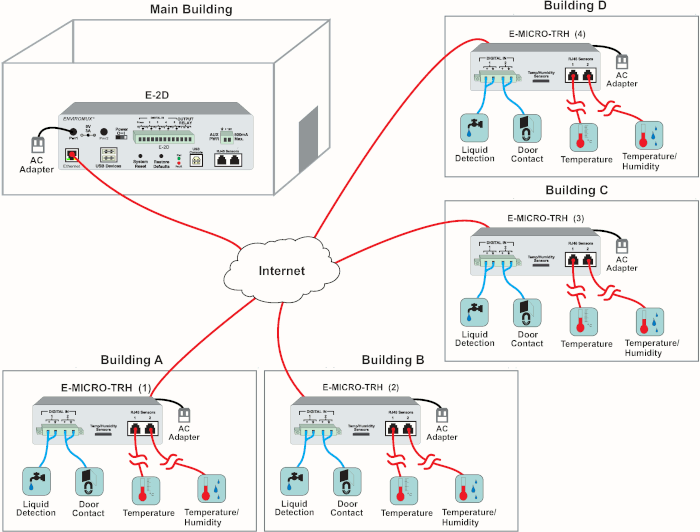
The E-MICRO-TRH(P) Remote Temperature/Humidity Sensors over IP can function as an IP-connected remote sensor for the E-2D. To add a remote IP sensor, access the web interface and select Monitoring > IP Sensors. Click on the "Add New IP Sensor" link on the bottom and key in the description and IP address of the E-MICRO-TRH(P) to connect it to the E-2D. Up to eight remote IP sensors can be connected. All sensors connected, including the Remote Temperature/Humidity Sensors over IP, to the E-2D can be viewed on one summary page.
In addition to 8 E-MICRO IP sensors, the E-2D also supports 4 E-1W Remote 1-Wire Temperature/Humidity Sensors over IP.
-
E-2D Supports the RADIUS Protocol
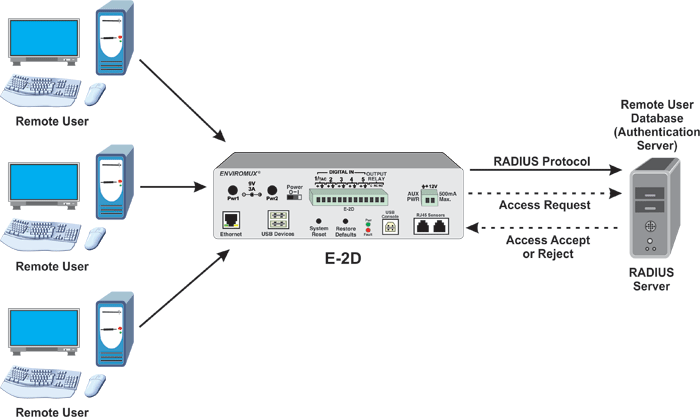
The E-2D Small Enterprise Environment Monitoring System supports the RADIUS protocol. Remote Authentication Dial-In User Service (RADIUS) is a client/server protocol that provides centralized authentication, authorization, and accounting management for users who connect and use a network service. When a user accesses the ENVIROMUX system, an authentication request is sent to the RADIUS server to determine the user's permission level and authorizes access.
-
How to Connect Multiple Smoke Detectors to a Single E-2D/5D/16D Using the Digital I/O Expander.
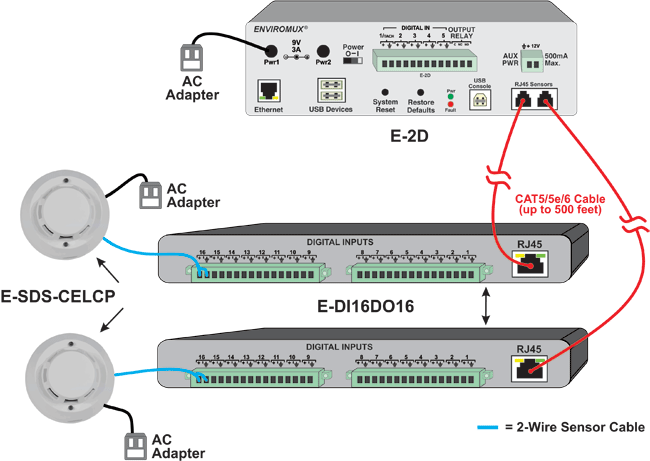
By connecting the E-DI16DO16 Digital Input/Open Collector Output Expander to the ENVIROMUX unit's RJ45 sensor port using up to 500 feet of CAT5/5e/6 cable, up to 16 additional smoke detectors can be added to each expander. Since the E-DI16DO16 does not supply power, the E-SDS-CELCP Low-Cost Smoke Detector Sensor (CE) with an included power supply should be connected to the expander using 22-gauge 2-wire sensor cables. Based on the desired number of smoke detectors, more expanders can be connected to the ENVIROMUX unit as long as there are RJ45 sensor ports available.
Other self-powered sensors, such as the E-IMD-P Infrared Motion Sensor and E-CMD-P Carbon Monoxide Detector will also work with this set-up. Each sensor can be located up to 1000 ft away from the expander.
Note: Since the ENVIROMUX unit does not provide power to the smoke detector, it cannot remotely reset the smoke detector power when connected through the E-DI16DO16. Unlatch the activated smoke detector by simply unplugging and replugging the power supply.
Note: When using the E-DI16DOR16-V2 Digital Input/Normally-Open Relay Contact Output Expander, the power supply for the smoke detectors can be run through a relay contact on the expander. This allows users to remotely power cycle if needed.
Note: The 12V/1A power supply included with the E-SDS-CELCP can provide power to additional E-SDS-CELC-V2 units through daisy chaining. The E-SDS-CELCP has a minimum operating voltage of 9V. As there will be power loss with this configuration, attention must be given to the gauge and length of the power conductors used to determine the number of units it can support and how far the units can go. Caution: If the single power supply fails, none of the smoke detectors in the string will work. Additional power supplies may be required to assure protection of the area should a power supply fail.
-
Use Smart Alerts to Inhibit Motion Sensor When Entering a Room Using a Keypad
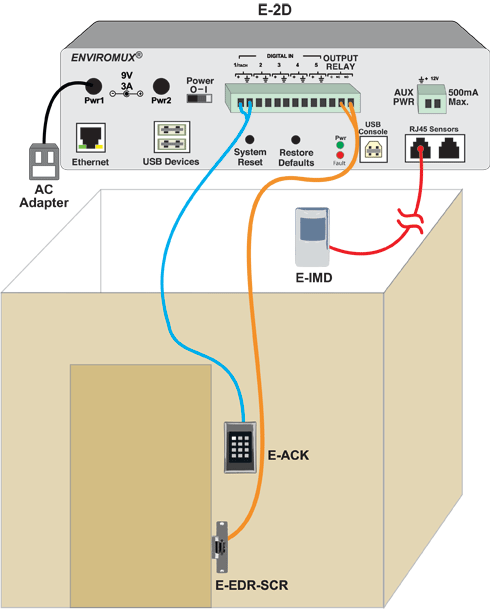
Events and Smart Alerts can be set-up to enable a configuration that will allow the disabling of motion sensors during the time an operator enters an enclosed area via a keypad, but will re-arm the motion sensors when he exits the area and re-enters the keypad code. This requires the keypad output relay, which will be programmed in "Start/Stop" mode instead of timed delay, to be connected as a digital input to the ENVIROMUX and an output relay from the ENVIROMUX that will activate the door strike when the correct code is entered.
For details on how to set up this configuration, refer to the Knowledge Base entry.
-
Use a Single USB 4G Modem to Send Out SMS Alerts from Multiple ENVIROMUX Units.
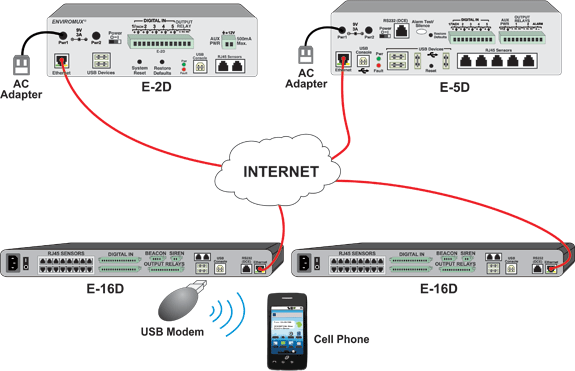
Set up the E-4GU-3/6 on one ENVIROMUX unit. Access the web interface of the ENVIROMUX equipped with the modem, and click on Administration > Enterprise, and expand SMS Relay. Select the checkbox for "Enable Server"; this only applies to the ENVIROMUX unit with the modem. Access the other ENVIROMUX units' web interface (no modem) and navigate to SMS Relay. Select the checkbox for "Use remote unit to send SMS" and in the textbox, "Remote unit IP Address," type in the IP address of the ENVIROMUX unit with the E-4GU-3/6. Configure any desired SMS alert settings on all ENVIROMUX units. Any SMS alert messages triggered on the other ENVIROMUX units will be sent through the Ethernet to the main SMS alert unit, which will then use the E-4GU-3/6 to send the messages.
This reduces the number of E-4GU-3/6 units needed to support SMS alerts when using multiple ENVIROMUX units. This SMS relay function is not restricted to identical units and can be integrated with any number and type of E-2D/5D/16D units. No management software is required to set up the SMS relay feature.
CAD Drawings
-
E-2D
-
E-RK1-2D
-
PWR-SPLY-9V3A
-
"The E-2D is located at an AM transmitter site. It was purchased for power monitoring. I like the comprehensive power monitoring along with the price, accessories, and so far the reliability. I would recommend this solution."
Jess M.iHeartMedia IncMinneapolis, MN
-
"We install and maintain the E-2D and sensors for the end user. NTI's Environment Monitoring System works flawlessly. We and the end user are very pleased, and we will continue to order more as they are needed."
Michael P.Professional CommunicationsMidland, TX
Network Technologies Inc |
 |