NTI® - Network Technologies Incorporated

Touch screen monitor sharer Hub
Numerous Control Methods

Multiple Touch Screen Monitors One PC

VOPEX Touch Screen Sharer

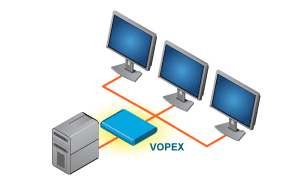
Allows 2 or 4 Touch Screen Monitors to communicate with 1 PC.

Also known as: VGA video splitter, KVM splitter for touch screen, access one computer from multiple locations
touch screen sharer, touch screen monitor, hub, touch screen KVM splitter, numerous touch screen to one PC.

Additional Product Information

Numerous Touch screen monitors can communicate with one computerCustomer Testimonial
The VOPEX Touch screen KVM splitter allows numerous monitors to share one PC.
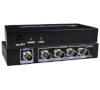
VOPEX-4MM-BI (Front & Back)


Designed and Manufactured<br> in the U.S.A.

Features & Applications

The VOPEX Touch Screen Sharer enables up to 2 or 4 touch screen monitors to communicate with 1 CPU. Three different operating modes allow varying degrees of user control. LED's on the front panel will illuminate to indicate mode of operation, DELAY mode program status, and/or which touch screen has control.
  • For use with NTI's VGA Splitter.
  • Three modes of user control operation.
  • Allow numerous touch screen monitors to communicate with 1 computer.

Specifications

Control Methods

Touch Screen
  • 2-4 Male 9 pin D serial connectors to the touch screen.
  • 1 Female 9 pin D serial connector to the HOST computer.
Power
  • 110 or 220 VAC at 50 or 60 Hz.
Environmental
  • Operating temperature: 32°F to 100°F (0°C to 38°C)
  • Storage temperature: -20°F to 140°F (-30°C to 60°C)
  • Operating and Storage Relative Humidity: 17 to 90% non-condensing RH
Warranty
  • Two years
  • USERx mode, only one user has control over the computer, until the user setting is manually changed.
  • INST mode, all users of touch screens connected to the switch have simultaneous control over the computer.
  • Each user has equal control, no users are locked out.
  • DELAY mode, the first touch screen to be made active by a user gets control while other touch screens are locked out until activity stops for a programmable delay time period.
  • LED's on the front panel will illuminate to indicate mode of operation, DELAY mode program status, and/or which touch screen has control.
  • A red BUSY LED located on the front of the Vopex indicates when one of the screens is in use while in DELAY and INST modes.
Vopex Touch Screen Sharer

VOPEX Touch Screen Sharer

NTI Part # # of
Ports
Desktop Size
WxDxH(In.)
Price $ # to
Quote
# to
Buy
Download a
PDF Manual
VOPEX-2MM-BI 2 8x6.2x2.6 255 Download a PDF version of our manual
VOPEX-4MM-BI 4 8x6.2x2.6 285
Request Quote